---
title: How To Run A Bulk Update
description: How to run a bulk update in Automate Shipping Profiles
---
[Skip to content](https://knowledge-asp.intuitiveshipping.com/how-to-run-a-bulk-update#main-content)
[](https://knowledge-asp.intuitiveshipping.com?hsLang=en)
- [FAQ](https://knowledge-asp.intuitiveshipping.com/frequently-asked-questions)
- [Intuitive Shipping](https://intuitiveshipping.com)
Open main navigation
Close main navigation
- [FAQ](https://knowledge-asp.intuitiveshipping.com/frequently-asked-questions)
- [Intuitive Shipping](https://intuitiveshipping.com)
- [Contact us](https://knowledge-asp.intuitiveshipping.com/contact)
[Contact us](https://knowledge-asp.intuitiveshipping.com/contact?hsLang=en)
How can we help?
- There are no suggestions because the search field is empty.
1. [Automate Shipping Profiles Help Center](https://knowledge-asp.intuitiveshipping.com/?hsLang=en)
2. [How-To](https://knowledge-asp.intuitiveshipping.com/how-to?hsLang=en)
# How To Run A Bulk Update
## Run a bulk update to activate new or updated Profile Conditions or after importing Shopify settings changes.
**Contents:**
- [How It Works](https://knowledge-asp.intuitiveshipping.com/how-to-run-a-bulk-update#how-it-works)
- [Run A Bulk Update](https://knowledge-asp.intuitiveshipping.com/how-to-run-a-bulk-update#run-bulk-update)
Each time you make changes that affect how products are sorted, you must run a **Bulk update** to apply those changes.
### How It Works
Any time you add, remove, or edit a [Profile Condition](https://knowledge-asp.intuitiveshipping.com/profile-conditions?hsLang=en), you must run a **Bulk update** to apply those changes. Likewise, if you make changes to your [Shopify shipping profiles](https://knowledge-asp.intuitiveshipping.com/how-to-add-custom-shopify-shipping-profiles?hsLang=en), such as adding or removing a profile, you'll also need to run a Bulk update. This ensures Automate Shipping Profiles is using your latest configuration and sorting products accurately.
### Run A Bulk Update
**1.** Click **Settings** on the main menu.
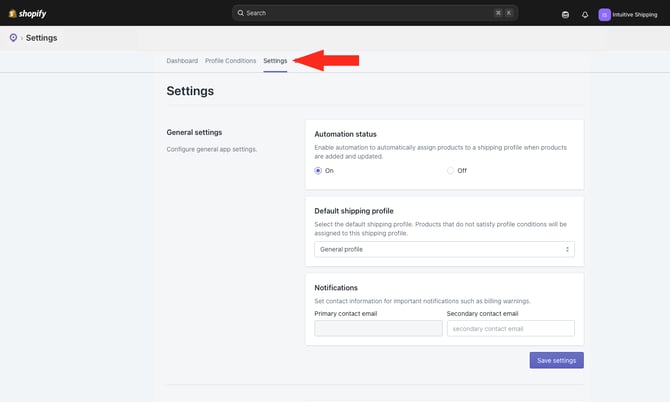
**2.** Scroll down to **Bulk update**.
**3.** Click the **Bulk update products** button.
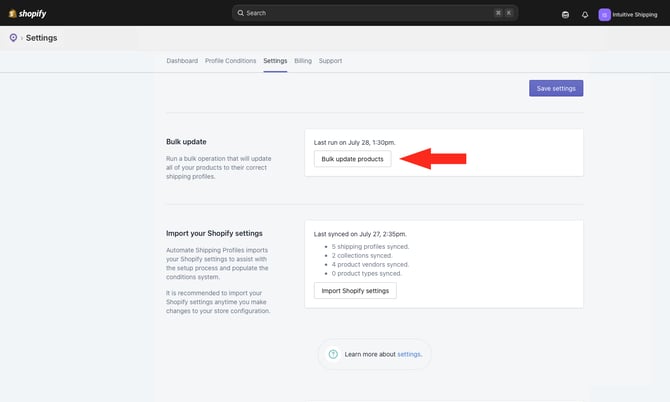
You can continue using Automate Shipping Profiles while the Bulk update is running. However, we recommend waiting until the update is complete before making any changes.
### Learn more:
- [Get Started](https://knowledge-asp.intuitiveshipping.com/get-started?hsLang=en)
- [How-To](https://knowledge-asp.intuitiveshipping.com/how-to?hsLang=en)
- [Billing](https://knowledge-asp.intuitiveshipping.com/billing?hsLang=en)
- [General Info](https://knowledge-asp.intuitiveshipping.com/general-info?hsLang=en)
- [FAQ](https://knowledge-asp.intuitiveshipping.com/frequently-asked-questions?hsLang=en)
- [Get Started](https://knowledge-asp.intuitiveshipping.com/get-started?hsLang=en)
- [How-To](https://knowledge-asp.intuitiveshipping.com/how-to?hsLang=en)
- [Billing](https://knowledge-asp.intuitiveshipping.com/billing?hsLang=en)
- [General Info](https://knowledge-asp.intuitiveshipping.com/general-info?hsLang=en)
- [Get Help](https://knowledge-asp.intuitiveshipping.com/get-help?hsLang=en)
- [Intuitive Shipping](https://intuitiveshipping.com/)
- [FAQ](https://knowledge-asp.intuitiveshipping.com/frequently-asked-questions)
- [Privacy Policy](https://intuitiveshipping.com/legal/privacy)
- [Terms](https://intuitiveshipping.com/legal/terms)
- [EULA](https://intuitiveshipping.com/legal/eula)
[](https://knowledge-asp.intuitiveshipping.com?hsLang=en)
Copyright © 2026, Intuitive Shipping