---
title: How It Works
description: Automate Shipping Profiles lets you easily create custom conditions that automatically assign products to specific Shipping Profiles.
---
[Skip to content](https://knowledge-asp.intuitiveshipping.com/how-it-works#main-content)
[](https://knowledge-asp.intuitiveshipping.com?hsLang=en)
- [FAQ](https://knowledge-asp.intuitiveshipping.com/frequently-asked-questions)
- [Intuitive Shipping](https://intuitiveshipping.com)
Open main navigation
Close main navigation
- [FAQ](https://knowledge-asp.intuitiveshipping.com/frequently-asked-questions)
- [Intuitive Shipping](https://intuitiveshipping.com)
- [Contact us](https://knowledge-asp.intuitiveshipping.com/contact)
[Contact us](https://knowledge-asp.intuitiveshipping.com/contact?hsLang=en)
How can we help?
- There are no suggestions because the search field is empty.
1. [Automate Shipping Profiles Help Center](https://knowledge-asp.intuitiveshipping.com/?hsLang=en)
2. [Get Started](https://knowledge-asp.intuitiveshipping.com/get-started?hsLang=en)
# How It Works
## Automate Shipping Profiles lets you create Profile Conditions that automatically assign products to specific shipping profiles.
**Contents:**
- [Getting Started](https://knowledge-asp.intuitiveshipping.com/how-it-works#getting-started)
- [The Basics](https://knowledge-asp.intuitiveshipping.com/how-it-works#the-basics)
- [Billing Plans](https://knowledge-asp.intuitiveshipping.com/how-it-works#billing-plans)
Automate Shipping Profiles saves you from having to manually assign your entire product catalog, one by one, to its respective **Shopify shipping profile**. When you install the app, you simply need to create a **Profile Condition** for each of your Shopify shipping profiles. When you run a **Bulk update**, the app will assign your products to their respective profile.
- Save time by automating a tedious manual process
- New products are automatically sorted into the proper shipping profile
- Activate the app to enable automated product sorting

Learn more about [Shopify's shipping profiles feature](https://help.shopify.com/en/manual/shipping/setting-up-and-managing-your-shipping/shipping-profiles).
**Please note:** Automate Shipping Profiles does *not* do rating at checkout. Shipping rates must be assigned to your shipping profiles in Shopify.
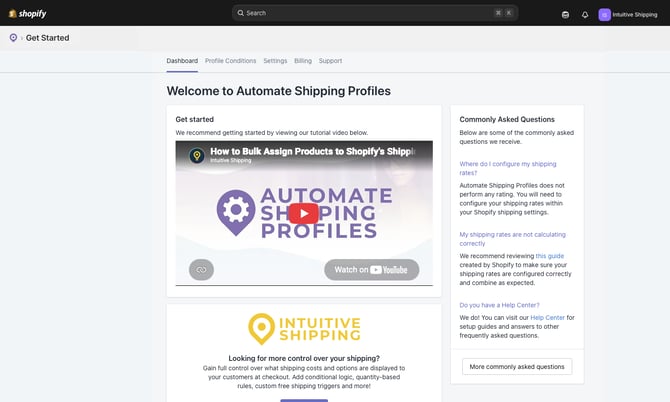
### Getting Started
This is your default starting point each time you sign into the app, and where you'll find key information to help you get the most out of Automate Shipping Profiles.
### The Basics
Here are a few key things to know before getting started with Automate Shipping Profiles.
#### Shipping Profiles & Profile Conditions
To use the app, you'll need at least two **Shopify shipping profiles** and at least one **Profile Condition**.

Learn more about [shipping profiles](https://knowledge-asp.intuitiveshipping.com/how-to-add-custom-shopify-shipping-profiles?hsLang=en) and [profile conditions](https://knowledge-asp.intuitiveshipping.com/profile-conditions?hsLang=en).
**Shipping profiles** are managed in your Shopify settings and let you create different shipping rates for specific products and shipping zones.
**Profile Conditions** are the rules that automatically assign products to specific shipping profiles when their criteria are met.
Unlike our flagship app, Intuitive Shipping, Automate Shipping Profiles doesn't calculate shipping rates. Instead, it automatically moves products and variants between shipping profiles. Shopify then displays the shipping rates configured for the shipping profiles associated with the products in the customer's cart.
Are your shipping requirements more advanced? Learn more about our [Intuitive Shipping](http://intuitiveshipping.com) app for Shopify and BigCommerce.
#### Automation
Automate Shipping Profiles eliminates the need to manually move products between shipping profiles, saving you time and helping keep your shipping setup organized.
Once you've configured your **Profile Conditions** and synced your Shopify **shipping profiles**, run a **Bulk update** to sort all of your products into the appropriate shipping profiles with a single click. After that, any new products added to your Shopify store will be assigned automatically based on your Profile Conditions.
If you add, remove, or edit a Profile Condition, you'll need to run another bulk update to apply those changes.
Automate Shipping Profilesis free to use in **Setup mode**. You can configure ASP while in Setup mode, but automation, including bulk updates, isn't available until you activate your account by selecting a billing plan.
#### How-to Guides
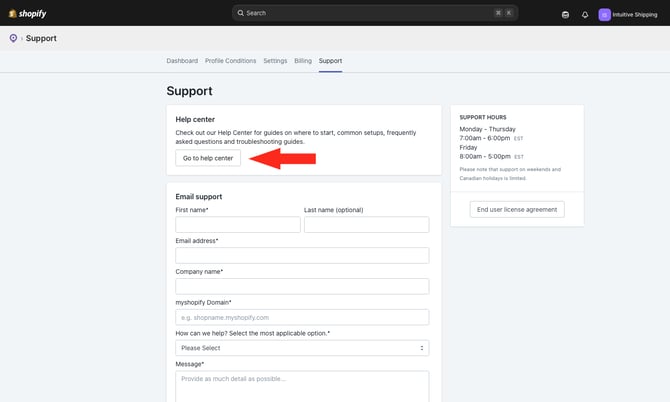
We've designed Automate Shipping Profiles to be easy to use. If you ever need help, the ASP Help Center (you're looking at it!) includes detailed guides covering the app's features and settings. You can access it at any time by clicking **Go to help center** on the app's **Support** page.
#### Stay in the Loop
Stay informed about the status of Automate Shipping Profiles by subscribing to our **Status Page** for timely updates on service disruptions.

Subscribe to our [status page](https://status.intuitiveshipping.com/).
### Billing Plans
Automate Shipping Profiles pricing is based on the number of products in your Shopify product catalog. Each plan includes full access to all features and the same level of support, so nothing is locked behind a paywall.
The **Unlimited** plan has no product limit, so automation will never be suspended due to catalog size. If you're using either the **Growth** or **Professional** plan, and your product catalog exceeds the plan limit, automation will be temporarily available until you upgrade to a plan that supports your current catalog size. You can upgrade at any time to avoid disrupting automation. You can also downgrade your plan, provided your current product count is within the limit of the plan you want to switch to.

Learn more about [ASP billing plans](https://knowledge-asp.intuitiveshipping.com/select-a-billing-plan?hsLang=en).
### Learn more:
- [Get Started](https://knowledge-asp.intuitiveshipping.com/get-started?hsLang=en)
- [How-To](https://knowledge-asp.intuitiveshipping.com/how-to?hsLang=en)
- [Billing](https://knowledge-asp.intuitiveshipping.com/billing?hsLang=en)
- [General Info](https://knowledge-asp.intuitiveshipping.com/general-info?hsLang=en)
- [FAQ](https://knowledge-asp.intuitiveshipping.com/frequently-asked-questions?hsLang=en)
- [Get Started](https://knowledge-asp.intuitiveshipping.com/get-started?hsLang=en)
- [How-To](https://knowledge-asp.intuitiveshipping.com/how-to?hsLang=en)
- [Billing](https://knowledge-asp.intuitiveshipping.com/billing?hsLang=en)
- [General Info](https://knowledge-asp.intuitiveshipping.com/general-info?hsLang=en)
- [Get Help](https://knowledge-asp.intuitiveshipping.com/get-help?hsLang=en)
- [Intuitive Shipping](https://intuitiveshipping.com/)
- [FAQ](https://knowledge-asp.intuitiveshipping.com/frequently-asked-questions)
- [Privacy Policy](https://intuitiveshipping.com/legal/privacy)
- [Terms](https://intuitiveshipping.com/legal/terms)
- [EULA](https://intuitiveshipping.com/legal/eula)
[](https://knowledge-asp.intuitiveshipping.com?hsLang=en)
Copyright © 2026, Intuitive Shipping