---
title: How To Contact Us
description: How to contact Intuitive Shipping about the Automate Shipping Profiles app.
---
[Skip to content](https://knowledge-asp.intuitiveshipping.com/contact#main-content)
[](https://knowledge-asp.intuitiveshipping.com?hsLang=en)
- [FAQ](https://knowledge-asp.intuitiveshipping.com/frequently-asked-questions)
- [Intuitive Shipping](https://intuitiveshipping.com)
Open main navigation
Close main navigation
- [FAQ](https://knowledge-asp.intuitiveshipping.com/frequently-asked-questions)
- [Intuitive Shipping](https://intuitiveshipping.com)
- [Contact us](https://knowledge-asp.intuitiveshipping.com/contact)
[Contact us](https://knowledge-asp.intuitiveshipping.com/contact)
How can we help?
- There are no suggestions because the search field is empty.
1. [Automate Shipping Profiles Help Center](https://knowledge-asp.intuitiveshipping.com/?hsLang=en)
2. [Get Help](https://knowledge-asp.intuitiveshipping.com/get-help?hsLang=en)
# How To Contact Us
## We're here to help!
**Contents:**
- [Submit A Ticket](https://knowledge-asp.intuitiveshipping.com/contact#submit-a-ticket)
- [Status Page](https://knowledge-asp.intuitiveshipping.com/contact#status-page)
**Have a question right now? Submit a new ticket** [here](https://knowledge-asp.intuitiveshipping.com/contact#have-a-question).
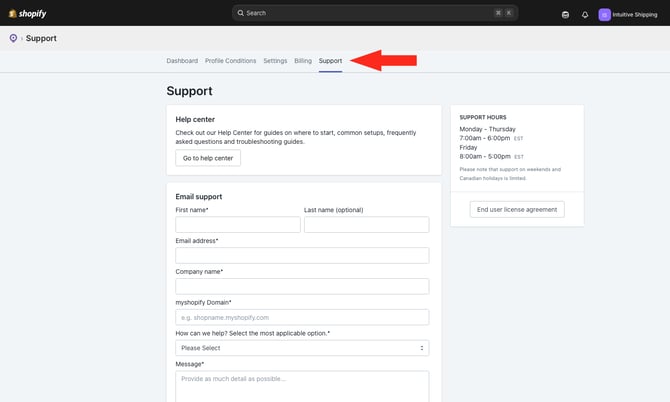
Get the help you need through the app's Support page. Click **Support** on the main menu.
### Submit A Ticket
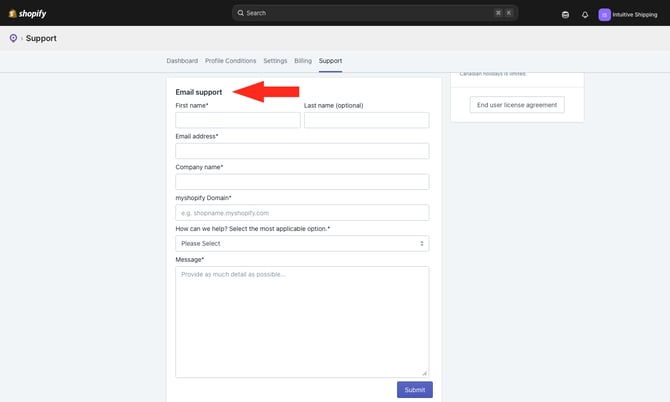
If you need help while you're using Automate Shipping Profiles, submit an email support ticket from the app's **Support** page. We typically respond within one business day.
**Regular Support Hours**
- Monday to Thursday: 7:00 am to 6:00 pm
- Friday: 8:00 am to 5:00 pm
\*All times are Eastern Standard/ Eastern Daylight Time (UTC - 05:00/ UTC - 04:00)
We update our support hours periodically, so be sure to check here or the app's Support page for our current support times.
#### Have A Question Now?
If you can't find the answers you need here in the Automate Shipping Profiles Help Center, let us know how we can help by completing the form below.
### Status Page
Check out our **Status page** for real-time app updates. We also provide updates when our carrier partners have rates-related issues.

View and subscribe to our Status page [here](https://status.intuitiveshipping.com/).
Be sure to add the Status page to your **browser bookmarks**. You can also click the **Subscribe To Updates** button at the top of the Status page to receive status alerts via email, text, Slack, or Teams.
### Learn more:
- [Get Started](https://knowledge-asp.intuitiveshipping.com/get-started?hsLang=en)
- [How-To](https://knowledge-asp.intuitiveshipping.com/how-to?hsLang=en)
- [Billing](https://knowledge-asp.intuitiveshipping.com/billing?hsLang=en)
- [General Info](https://knowledge-asp.intuitiveshipping.com/general-info?hsLang=en)
- [FAQ](https://knowledge-asp.intuitiveshipping.com/frequently-asked-questions?hsLang=en)
- [Get Started](https://knowledge-asp.intuitiveshipping.com/get-started?hsLang=en)
- [How-To](https://knowledge-asp.intuitiveshipping.com/how-to?hsLang=en)
- [Billing](https://knowledge-asp.intuitiveshipping.com/billing?hsLang=en)
- [General Info](https://knowledge-asp.intuitiveshipping.com/general-info?hsLang=en)
- [Get Help](https://knowledge-asp.intuitiveshipping.com/get-help?hsLang=en)
- [Intuitive Shipping](https://intuitiveshipping.com/)
- [FAQ](https://knowledge-asp.intuitiveshipping.com/frequently-asked-questions)
- [Privacy Policy](https://intuitiveshipping.com/legal/privacy)
- [Terms](https://intuitiveshipping.com/legal/terms)
- [EULA](https://intuitiveshipping.com/legal/eula)
[](https://knowledge-asp.intuitiveshipping.com?hsLang=en)
Copyright © 2026, Intuitive Shipping